以前、XmlDocumentクラスを使ってXMLを読み込み、パースする方法について書いた。
XmlDocument()でXMLをパースする その1 - Unityな日々(Unity Geek)
XmlDocument()でXMLをパースする その2 - Unityな日々(Unity Geek)
が、XMLファイルの読み込み&パースは、ファイルパスの指定方法を含めて結構忘れるので、再度、備忘録としてサンプルスクリプトをまとめておく。
サンプルスクリプト
using UnityEngine;
using System.Collections;
using System.Collections.Generic;
using System.Xml;   //XMLを扱う場合に必要
using Xooms;

namespace Xooms{
    public class FelicaDataSet : MonoBehaviour {

        //Public Variables
        public bool isFileInput = false;
        public string dirname   ="data";    //Output Directory
        public string fname ="felicadata";      //File-Header ** '.xml' not necessary !

        //Private Variables
        private XmlDocument xmlDoc;

        //Public Functions

        //--------------
        // Initialization
        void Start () {
            if(isFileInput) {
                xmlDoc = ReadXML();
                ParseXML(xmlDoc);
            }
        }


        private XmlDocument ReadXML()   //XMLファイルを読み込む
        {
            //
            string dlm ="/";
            string path;
            if(dirname != "") {
                path = dlm + dirname + dlm;
            } else {
                path = dlm;
            }
            string fullpath;
            if(Application.isEditor){
                fullpath = Application.dataPath + path + fname; //エディタの場合, Application.dataPathは'Asset'フォルダ
            }else{
                fullpath = Application.dataPath + dlm + ".." + path + fname;    //PC/Macの場合,Application.dataPathは、'実行ファイル_data'フォルダ

            }
            XmlDocument xmlDoc = new XmlDocument(); //XmlDocumentクラス
            xmlDoc.Load(fullpath); // load the file.    //XMLデータをロード

            return xmlDoc;  //読み込んだXmlDocumentを返す
        }

        private void ParseXML(XmlDocument xmlDoc){  //XMLをパースする
            //Parse XML List
            XmlNode all = xmlDoc.FirstChild;    //最初のノード 'FelicaData'タグ
            Debug.Log("FirstChild " + all.InnerText);   //子ノードをふくむ、すべてのタグのテキストが表示される
            //
            XmlNodeList header = all.FirstChild.ChildNodes; //最初のノード='Header'タグの、子ノードのリスト
            foreach (XmlNode node in header){
                Debug.Log(node.Name + ", " + node.InnerText);   //タグ名と、テキストを表示
            }
            //
            XmlNodeList models = xmlDoc.GetElementsByTagName("Model");  //'Model'タグのリストを作る
            foreach (XmlNode model in models){
                Debug.Log(model.Attributes["id"].Value + ", " + model.InnerText);   //属性'id'と、テキストを表示
            }
            //
            XmlNodeList actions = xmlDoc.GetElementsByTagName("Action");    //'Action'タグのリストを作る
            foreach (XmlNode action in actions){
                Debug.Log(action.Attributes["id"].Value + ", " + action.InnerText); //属性'id'と、テキストを表示
            }
        }


    }
}
サンプルデータ sampledata.xml
<FelicaData>
  <Header>
    <Title>Test Data</Title>
    <Subtitle>Input Test</Subtitle>
    <Date>2015/9/13</Date>
  </Header>
  <Models>
    <Model id="00" >012E34E7C00D7D58</Model>
    <Model id="01" >012E34E7C00D7C42</Model>
    <Model id="02" >012E34E7C00D7D27</Model>
    <Model id="03" >012E34E7C00D7DB1</Model>
    <Model id="04" >012E34E7C00D7AAB</Model>
  </Models>
  <Actions>
    <Action id="00" >012E34E7C00D7BAD</Action>
    <Action id="01" >012E34E7C00D7E83</Action>
    <Action id="02" >012E34E7C00D7D1D</Action>
    <Action id="03" >012E34E7C00D88BA</Action>
    <Action id="04" >012E34E7C00D7E3A</Action>
  </Actions>
</FelicaData>
補足
例:
doc.LoadXml("<book xmlns:bk='urn:samples' bk:ISBN='1-861001-57-5'>" +
                "<title>Pride And Prejudice</title>" +
                "</book>");
XmlNode all = xmlDoc.FirstChildは、XMLの最初のノード、すなわちになる。 all.InnerText)は、子ノードをふくむすべてのテキストをつなぎあわせたもの('Test DataInput Test2015/9/13012E34E7C00D7D58012E34E7C00D7C42012E34E7C00D7D27012E34E7C00D7DB1012E34E7C00D7AAB012E34E7C00D7BAD012E34E7C00D7E83012E34E7C00D7D1D012E34E7C00D88BA012E34E7C00D7E3A')になる。XmlNodeList header = all.FirstChild.ChildNodesは、の最初の子ノード、すなわち になる。 node.Nameはタグ名、node.InnerTextはテキスト名。
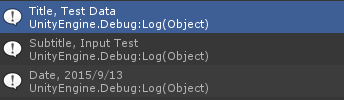
Debug.Log(node.Name + ", " + node.InnerText);の出力は次にようになる。
- タグ属性(アトリビュート)の値は、
XmlNode.Attributes[属性名].Valueで取得
